Developer & Tech
How Do You Decouple Database Transactions From LLM Calls in Production?
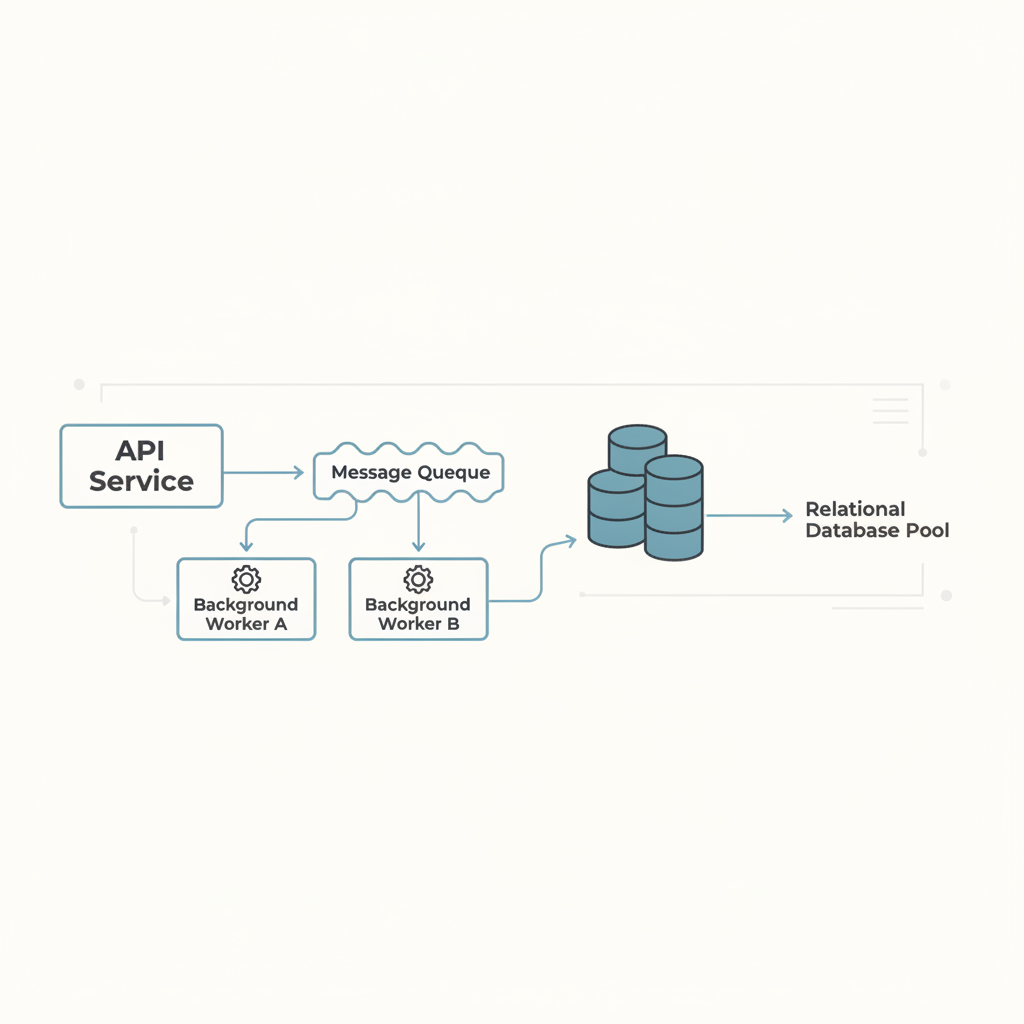
To decouple database transactions from LLM calls in production, you must never hold an open database transaction while awaiting an external model response. Instead, commit user input to your primary database first with an initial pending status, publish a task to an asynchronous background queue, process the inference call outside any transactional boundary, and write the generated output back in a separate, isolated transaction upon completion.
Holding transactional locks during slow network input-output operations exposes relational databases to catastrophic connection pool exhaustion. Standard database web requests expect latencies measured in single-digit milliseconds, whereas large language model inference routinely takes between two and thirty seconds. If your application architecture ties row locks or active connection leases to model completion, even modest traffic spikes will bring down your core infrastructure.
By Jim Vernon, Editor, AI Intelligence International · Published 2 November 2026 · Reviewed against our editorial standards · About the author
What are the key takeaways?
- Never wrap an external API call inside an active relational database transaction.
- Use the transactional outbox pattern to guarantee that inference jobs persist reliably without risking distributed state loss.
- Design every asynchronous completion handler to be idempotent by checking entity state versions before writing LLM responses.
- Set aggressive HTTP connection timeouts and worker-level dead-letter limits to free database pools during downstream vendor outages.
What does this article cover?
| Question answered | How Do You Decouple Database Transactions From LLM Calls in Production? |
|---|---|
| Topic | Developer & Tech |
| Reading time | About 9 minutes (2,062 words) |
| Written by | Jim Vernon, Editor, AI Intelligence International |
| Published | 2 November 2026 |
| Last updated | 2 November 2026 |
Why does invoking an LLM inside an active transaction cause system failure?
Relational databases rely on finite connection pools to handle concurrent traffic. When a web framework handles a standard create or update request, it checks out a database connection, executes SQL statements, and commits the transaction in roughly five to fifteen milliseconds. During this brief window, the database holds row locks and keeps connection sockets open. If your application code issues an HTTP request to an external LLM provider in the middle of that open transaction block, that database connection remains locked and idle while your server waits for the remote tokens to generate.
Commercial LLMs introduce uncontrollable latency that ranges from two seconds to well over twenty seconds during peak usage periods or complex reasoning generation. If ten concurrent users submit prompt requests simultaneously in an environment with a pool size of twenty connections, half of your available database capacity becomes completely frozen waiting for external network packets. Regular read and write queries for unrelated users instantly start queuing behind these stalled connections. Within seconds, the pool saturates, thread pools exhaust, health check probes fail, and your entire application crashes.
The fundamental rule of database hygiene is that external network input-output must never participate in database transactions. Network calls can stall, retry, fail, or drop without warning. Database transactions exist to enforce ACID guarantees over internal disk state, not to arbitrate distributed web services. Decoupling these processes is an operational necessity if you plan to scale beyond prototype usage levels.
How does the transactional outbox pattern solve this architecture problem?
The transactional outbox pattern bridges local database changes and external background processing without distributed two-phase commits. In this pattern, when an incoming user request arrives at your API, your application writes the prompt data and initial record into your primary business table, while simultaneously writing an event record into an outbox table within the exact same database transaction. Because both writes happen locally inside your database engine, the operation completes in five milliseconds, commits instantly, and immediately releases the database connection back to the connection pool.
A dedicated background worker or event relay process then monitors the outbox table by polling or using change data capture through database write-ahead logs. When the worker detects the new task, it claims the record, invokes the LLM API over standard network interfaces outside any database transaction, and awaits the response. Once the model returns the completion, the worker opens a fresh, short-lived transaction to write the final tokens back into the destination table and marks the outbox task as finished.
This architecture guarantees that you never lose an inference request if your server restarts, because the job was committed to durable disk before any network attempt occurred. More importantly, your primary web API threads remain completely insulated from upstream model delays, maintaining low response latencies and preserving your database connection pool for rapid user-facing traffic.
What does a concrete latency and connection pool calculation look like?
To understand the arithmetic of database pool exhaustion, consider a production web service running on a single application node configured with a maximum PostgreSQL connection pool size of 30 connections. Suppose the web application processes two types of endpoints: regular transactional CRUD operations that take an average of 10 milliseconds of database time, and an AI generation endpoint. If the AI endpoint keeps a database transaction open while waiting for an LLM response, each generation call holds a connection open for an average of 4 seconds, which is 4,000 milliseconds.
Now, let us calculate the impact when your system receives just 6 AI generation requests per second alongside 100 regular database requests per second. Under the coupled architecture, the 6 AI requests hold open 6 multiplied by 4 seconds, which equals 24 persistent database connections at steady state. This leaves only 6 connections remaining in the entire pool (30 minus 24) to handle the 100 regular requests per second. Since 100 requests requiring 0.01 seconds each demand 1.0 connection-second of capacity every second, any small spike in prompt generation will consume the remaining 6 connections, pushing connection acquisition wait times from 0 milliseconds to complete query timeouts within 30 seconds.
In contrast, let us examine the decoupled architecture using an outbox queue. The web server handles the 6 incoming AI requests by inserting them into the database and outbox table in 10 milliseconds per write. Six writes at 0.01 seconds require just 0.06 connection-seconds of capacity per second. The regular 100 requests consume their 1.0 connection-second. Combined, the web tier now consumes only 1.06 connection-seconds per second out of the pool capacity of 30, operating at less than 4 percent database pool utilisation. The slow 4-second LLM calls run on isolated background workers that do not hold database connections while awaiting remote HTTP data.
How do you handle status polling and client notifications without transactional locks?
Once you push LLM calls into background execution, your frontend client cannot wait on a single synchronous HTTP POST request to receive its answer. You must replace the synchronous request-response flow with an asynchronous polling or streaming notification pattern. When the user submits a prompt, the API returns an immediate HTTP 202 Accepted response containing a unique task identifier and an initial status of pending, allowing the user interface to render an appropriate loading state without holding an open network thread.
The client interface can then retrieve the finished result using short polling, long polling, or push-based protocols such as Server-Sent Events or WebSockets. In short polling setups, the client requests the task status every two seconds against a lightweight cached endpoint, often backed by an in-memory store like Redis to ensure polling checks do not touch the primary database at all. When the background worker finishes the LLM call and persists the result, it updates the cache key to completed and attaches the payload.
If your application requires real-time token streaming to maintain perceived performance, your background worker connects directly to the model provider using server-sent events, while broadcasting individual chunks across a pub-sub broker to an active WebSocket connection tied to the client. The database is entirely bypassed during the streaming phase; the worker aggregates the completed text in memory and executes a single write transaction only after the final token stream closes successfully.
How do you ensure idempotency when retrying failed LLM jobs?
Distributed background jobs inevitably encounter network timeouts, rate limit throttling, and transient provider outages. To make background workers resilient, you must implement automatic retry policies with exponential backoff and jitter. However, retrying an operation that generates text or triggers billing requires rigorous idempotency controls. If a worker sends a prompt to an LLM provider, receives a connection drop after the model generates the text, and retries blindly, you pay twice and risk inserting duplicate data or corrupting state.
You achieve idempotency by creating deterministic idempotency keys derived from the source task identifier and the specific retry iteration. Many commercial AI inference APIs support idempotency headers directly; passing your internal job identifier prevents the vendor from running duplicate generations if the original request was received. On your local database side, ensure that the background worker verifies the entity state before committing results. A database update must use optimistic concurrency checks, such as matching an updated_at timestamp or a status equal to in_progress.
If an update query returns zero affected rows because another process or a previous timeout already marked the job as completed or failed, the worker safely drops the operation without overwriting clean state. Furthermore, define a strict maximum retry ceiling, typically three attempts. If all retries fail, move the task to a dead-letter queue, set the record status to failed in the database, and return a clear, user-facing error message explaining that the upstream provider did not respond.
How should you structure database updates when using fallback models?
Production applications often use model routing or fallback hierarchies to maintain availability when a primary LLM provider suffers degradation. For instance, if your primary frontier model times out after eight seconds, your application logic might fail over to a faster secondary model from an alternate provider. Implementing this logic requires careful coordination so that model routing metadata does not compromise database performance.
Never allow the fallback loop to prolong the lifecycle of an existing database worker thread. If your background worker attempts model A and hits an explicit timeout threshold, log the failure locally, update an in-memory retry counter, and execute the fallback call immediately in the worker process. The database should only be contacted to record significant lifecycle milestones: when the job transitions between major processing stages or when the final response from whichever model succeeded is ready to save.
When saving the completed inference, always record the actual model identifier, prompt token counts, completion token counts, and execution duration in your database schema alongside the generated output. Recording this telemetry within the final, brief commit transaction gives your engineering team full visibility into fallback costs and latency profiles without introducing extra round-trips or prolonged connection holds while the decision routing takes place.
What do people ask most about this?
Can I use database connection pooling tools like PgBouncer instead of decoupling?
Connection poolers like PgBouncer manage connection reuse efficiently, but they cannot solve the problem of a connection held open during a twenty-second LLM call if your application uses transaction pooling. In transaction pooling mode, PgBouncer assigns a physical server connection for the entire duration of a transaction. If your application code opens a transaction and then waits on an external HTTP request, that physical database connection remains reserved at the pooler level, preventing any other worker from using it. Decoupling the network call from the database transaction is the only architectural solution that guarantees the connection is physically returned to the pool immediately.
What happens if the background worker crashes while calling the LLM?
If a background worker process crashes or restarts while waiting for an LLM response, the task status in your database will remain marked as in_progress or claimed. To recover from this cleanly, you must implement a stale-job detection process, often called a reaper. This scheduled task checks periodically for jobs that have remained in an in_progress state longer than your maximum expected timeout window, such as five minutes. The reaper resets the status back to pending and increments an attempt counter, allowing another healthy worker to pick up the job and retry it safely.
Is it safe to read from the database inside the background worker before calling the LLM?
Yes, it is entirely safe and standard practice to read necessary context data from your database before calling the LLM, provided that you read the data using a standard, non-locking SELECT query that completes and closes immediately. You should fetch all required user records, system prompts, or vector retrieval documents in a rapid read transaction, construct your prompt payload in application memory, close the database connection, and only then dispatch the HTTP request to the external AI provider. The worker should hold zero database resources while the remote inference runs.
How do I prevent workers from consuming all my database connections when saving results?
When running a large pool of background workers, multiple workers finishing their LLM calls concurrently can theoretically swamp your database with simultaneous write requests. To prevent this, configure dedicated, separate connection pools for your background worker service and your customer-facing web API. Set strict maximum connection limits on the worker pool so that even if fifty workers finish at the same microsecond, they can only occupy a predetermined subset of database connections, ensuring that regular user navigation on your primary application remains completely unaffected.
How was this article researched?
This article is written and maintained by Jim Vernon, Editor at AI Intelligence International. Figures and claims are drawn from the calculators and models published on this site, from vendor documentation current at the time of writing, and from first-hand testing of the tools described. Every article is reviewed against our editorial standards before publication and re-checked whenever the underlying tools or pricing change.